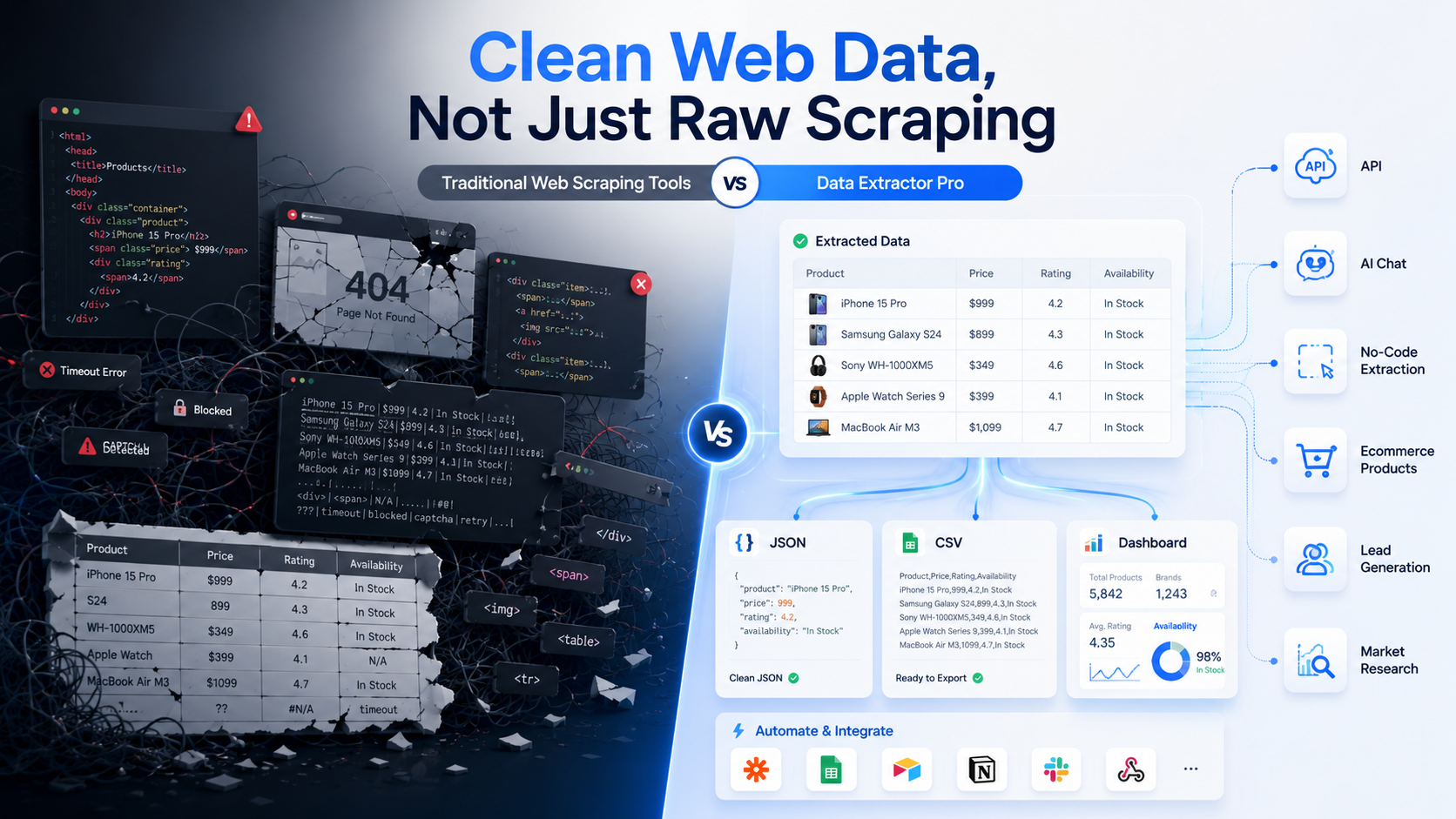
Web data is useful for almost every modern business. Ecommerce teams use it to monitor prices and product listings. Sales teams use it to build lead lists. Researchers use it to study markets and trends. Marketers use it to track competitors, reviews, and content performance. Developers use it to power dashboards, apps, and automation workflows.
However, collecting web data is only the first step. The real challenge is turning online information into clean, structured, and usable data.
Traditional web scraping tools can help users collect information from websites, but raw scraping is not always enough. Users often need to clean the data, remove duplicates, fix formatting, handle missing fields, and convert the output into a format that works for spreadsheets, reports, CRMs, databases, or APIs.
This is where Data Extractor Pro offers a different approach. Instead of focusing only on scraping web pages, Data Extractor Pro focuses on helping users extract clean web data in ready-to-use formats like JSON and CSV.
The Problem with Traditional Web Scraping
Traditional web scraping can be powerful, especially for technical teams. But it can also require time, setup, and ongoing maintenance.
In many scraping workflows, users need to inspect website pages, select the right elements, configure pagination, handle JavaScript-loaded content, manage errors, and test the scraper. For developers, this may be a normal part of the process. For business users, it can become complicated quickly.
Another challenge is that websites change. A layout update, new page structure, changed button, or renamed element can affect an existing scraping workflow. Because websites change frequently, scraping workflows may need occasional updates.
Data quality is another issue. A scraping tool may collect information, but the output may not always be clean. Users may receive extra text, broken URLs, missing prices, inconsistent product names, or duplicate rows. Before the data becomes useful, it often needs extra cleaning and formatting.
For many teams, the goal is not simply to scrape a website. The goal is to get structured data they can use immediately.
Common Types of Web Scraping Tools
There are several types of web scraping tools, and each one serves a different purpose.
No-code scraping tools such as Octoparse and ParseHub are popular for users who want visual point-and-click scraping. These tools are useful because they allow users to select data from web pages without writing code. They are a good choice for users who want to build custom scraping workflows through a visual interface.
Developer scraping platforms such as Apify are often better suited for technical teams. They provide flexibility, automation options, and marketplaces of scraping tools. These platforms are useful when developers want more control over scraping logic, workflows, and integrations.
Enterprise scraping and proxy platforms such as Bright Data are designed for large-scale data collection. They are useful for companies that need proxy infrastructure, anti-blocking support, scraping APIs, and enterprise-level reliability.
API-first scraping services such as ScraperAPI, ScrapingBee, and similar tools are commonly used by developers who want to send URLs and receive scraped results. These tools are helpful for handling scraping access, rendering, and proxy-related needs.
Data Extractor Pro fits into a different category: ready-made data extraction. It is designed for users who want structured JSON or CSV data from supported websites without building complex scraping systems from scratch.
Where Data Extractor Pro Is Different
Data Extractor Pro is different because it focuses on the final output: clean, structured data.
Many traditional tools focus on the scraping process. Data Extractor Pro focuses on helping users get usable data faster. This makes it useful for both technical and non-technical users.
One key advantage is clean JSON and CSV output. JSON is helpful for developers who want to integrate data into applications, dashboards, databases, or automation tools. CSV is useful for business users who want to open data in spreadsheets, reports, or analytics platforms.
Data Extractor Pro also provides API access, making it useful for developers who want to connect extracted data with internal systems or external tools. Instead of building a custom scraper for every use case, developers can use structured extractor APIs where available.
For non-technical users, Data Extractor Pro supports no-code workflows. This allows marketers, researchers, ecommerce managers, and sales teams to collect data without writing scripts or managing technical scraping steps.
Another useful feature is AI chat. AI-assisted extraction can help users describe what they need and move through the data extraction process more easily. This creates a more guided experience compared with manually configuring every field or selector.
The platform also focuses on ready-made extractors. Instead of asking users to create every workflow from zero, Data Extractor Pro offers extractors for supported websites and use cases. This can reduce setup time and help users get structured output faster.
Feature-by-Feature Comparison
No-code scraping tools are useful for users who want a visual way to build scraping workflows. They are often a good fit when users want control over what they select on a web page. However, users may still need to configure workflows and update them when website structures change.
Developer scraping platforms are powerful for technical teams. They are a strong choice when users need custom automation, advanced scraping logic, or flexible workflows. However, they may offer more complexity than a business user needs for simple structured data extraction.
Enterprise proxy and scraping platforms are best for large organizations with advanced infrastructure needs. They can support large-scale data collection and proxy management. However, not every team needs that level of infrastructure.
API-first scraping services are helpful for developers who want access to web content through API requests. Depending on the workflow, users may still need additional parsing or formatting before the data is ready to use.
Data Extractor Pro is best for users who want clean, structured data quickly through ready-made extractors, API access, no-code workflows, AI assistance, and JSON or CSV export options.
Who Should Use Data Extractor Pro?
Data Extractor Pro is useful for teams that want web data without spending too much time building and maintaining scraping workflows.
Ecommerce teams can use it to extract product names, prices, ratings, reviews, availability, and product URLs. This helps with price monitoring, product research, and competitor comparison.
Sales teams can use it to collect public business information and create lead lists. Instead of manually copying details from websites, teams can export structured data and use it for outreach or qualification.
Researchers can use Data Extractor Pro to collect datasets for market research, pricing studies, trend analysis, and competitor research.
Marketers can use it to monitor competitor content, product positioning, reviews, and marketplace trends.
Developers can use API access to connect extracted data with dashboards, apps, CRMs, databases, or automation workflows.
Automation teams can use structured web data to trigger workflows, update reports, or send information to other business systems.
Use Cases
Data Extractor Pro can support many practical business workflows.
For price monitoring, users can track product prices across supported websites and compare competitor pricing. This helps ecommerce teams understand market changes and make better pricing decisions.
For product data extraction, users can collect product titles, prices, ratings, reviews, images, descriptions, availability, and URLs. This data can support product catalogs, marketplace research, and competitor analysis.
For lead generation, sales teams can collect structured business information and organize it into clean lists for outreach.
For competitor tracking, businesses can monitor products, reviews, pricing, and content changes across supported sources.
For market research, analysts can collect structured data to study pricing patterns, customer sentiment, product demand, and industry trends.
For research datasets, developers and analysts can use JSON or CSV exports for dashboards, reports, machine learning preparation, or business intelligence.
Final Recommendation
Traditional web scraping tools are useful, but they are not always the best choice for every user.
If you need full scraping infrastructure, tools like Apify or Bright Data may fit. If you want visual no-code scraping, tools like Octoparse or ParseHub are popular. If you need API-first scraping access, tools like ScraperAPI or ScrapingBee may be useful.
But if your goal is to get clean, structured JSON or CSV data quickly through ready-made extractors and APIs, Data Extractor Pro is built for that workflow.
Data Extractor Pro is best for users who want structured, usable data quickly, not users who want to build and maintain complex scraping infrastructure.